PPPoE billing
Monthly lines with speed, data and time limits, expiry on a date or at first login, MAC lock, static IP, one-click renew and automatic disconnect when a package ends.
What is included →Manage PPPoE and hotspot customers, packages, vouchers, resellers, payments and MikroTik routers from one cloud platform - and let your customers check their own data, change their own password and reach you, in their own language.
New and free: 2 WAN load balancing script generator for MikroTik →
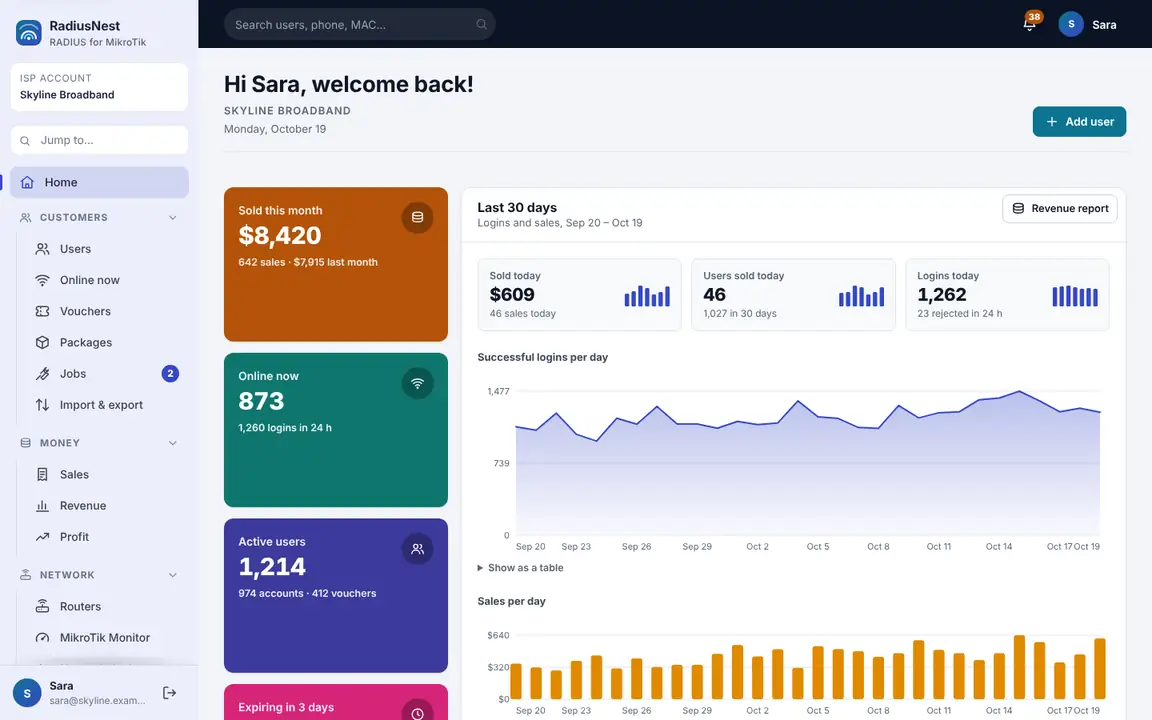
Real screens from RadiusNest, filled with example data.
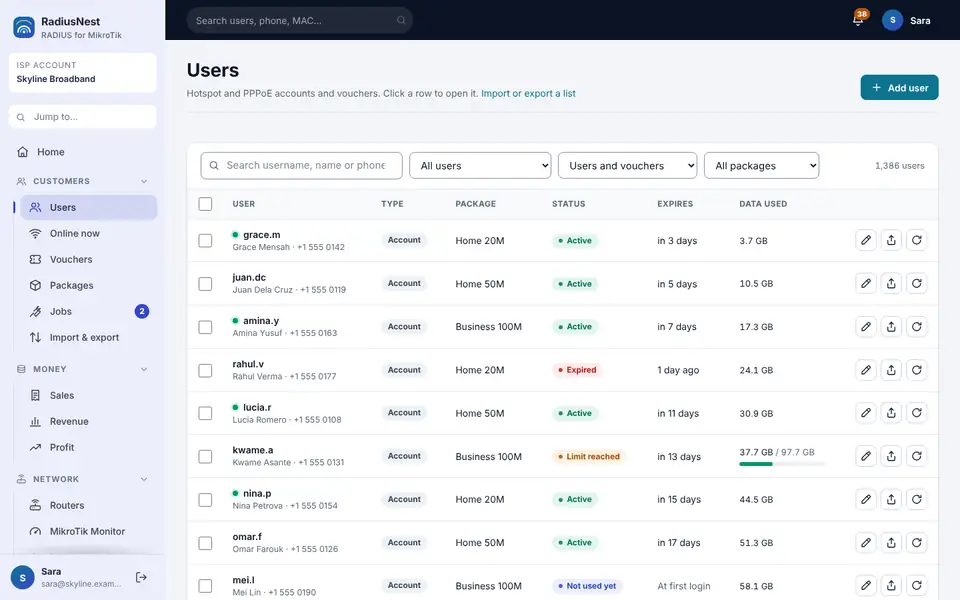
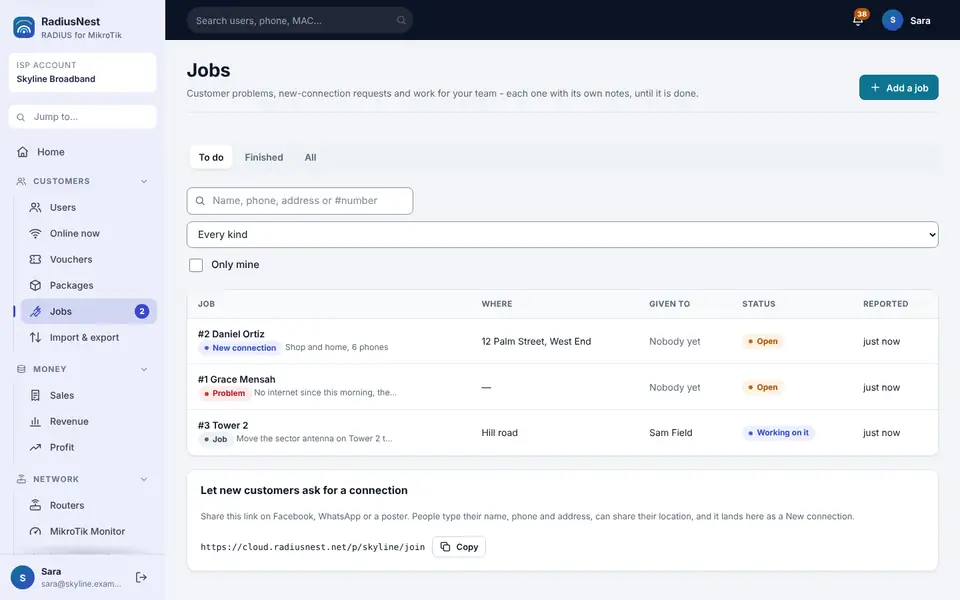
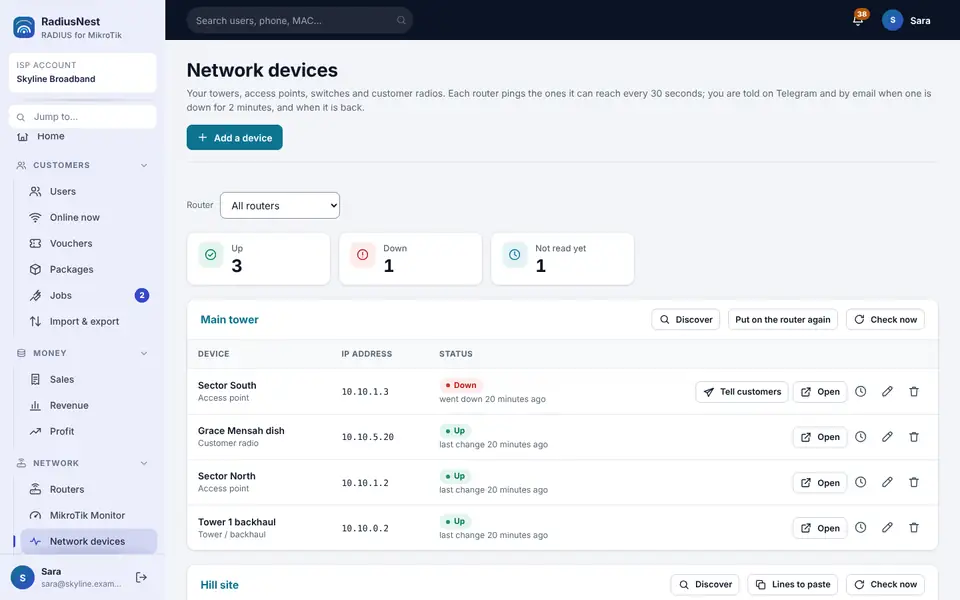
PPPoE lines, hotspot vouchers and the customers behind them - authenticated, limited, counted and renewed from one dashboard, on your phone or your PC. How the MikroTik billing system works →
Monthly lines with speed, data and time limits, expiry on a date or at first login, MAC lock, static IP, one-click renew and automatic disconnect when a package ends.
What is included →Print up to 1,000 cards at once - A4 sheets or a till roll - with your price and currency on them. A card's days start at first login, so stock never expires on the shelf.
What is included →Their own account page and your own Telegram bot: data left, days left, password change, log off, "WhatsApp only" and a message to you - in English, Urdu, Pashto, Persian or Arabic.
See it →No public IP, no port forwarding, nothing extra to build. The dashboard writes one script for the router you are adding; you paste it once. Not sure what your router has? Check your public IP and CGNAT.
# RadiusNest - router "Main office"
# Paste the whole script into Winbox > New Terminal
[1/8] secure link .............. created
[2/8] router address ........... assigned
[3/8] authentication ........... connected
[4/8] hotspot + PPPoE .......... using RadiusNest
[5/8] disconnect requests ...... allowed
[6/8] customer account page .... reachable
[7/8] "WhatsApp only" rules .... installed
[8/8] router status page ....... written
RadiusNest: router connected
Two internet lines on one MikroTik: enter the two WAN ports, download the .rsc, paste it in Winbox. PCC load balancing with automatic failover, tested on a real router. Free forever on this site, no account needed.
No public IP, no port forwarding, nothing opened on the router. Every router connected to RadiusNest already keeps an encrypted link to the cloud, so one tile on the router's page opens its WebFig in your browser or a Winbox address for your computer - from the office, from home, from your phone.
Press Open WebFig and the router's own web interface opens in a new tab. Quick Set, firewall, queues, terminal - everything, passed straight through to the router.
Press Open Winbox, copy the address into Winbox, connect with the router's own login. The port is yours alone and closes by itself after two hours.
One firewall rule for the RadiusNest server only. No user added, no password changed, owner login only, every session in the activity log, off with one press.
A ready authentication and billing service for ISPs, cable-net operators and Wi-Fi hotspot businesses. Nothing to install, nothing to maintain, no server to rent.
See all 50 features in 9 modules, with screens of the dashboard →
Every Hotspot and PPPoE customer on packages that enforce themselves.
Speed limits, validity, data and online-time limits, devices at the same time, IP pools and address lists - for Hotspot, PPPoE or both.
Expiry now, at first login, on a date or never. MAC lock, static IP, one-click renew, bulk actions and clear status for every user.
Up to 1,000 printable cards at once, with the price and your own currency on the card. Validity starts at first login, so unsold cards never expire on the shelf.
Expired users and users over their limits are refused with a clear message, and disconnected automatically while online.
A package for one device stays on one device. A second device is refused with a clear message, and any extra device that gets on is disconnected - the first one keeps its place.
A customer writes "why is my internet slow?" to your Telegram bot and gets an answer from their own account, in their own language, with the button that fixes it. Anything it cannot settle comes to you with one tap.
Sort customers by village, street or tower. See every customer, tower and open job on one map or in satellite view - tap a pin to call, navigate there or open the customer. How it works
Customers pay and renew on their own, and every sale is counted for you.
By card, Apple Pay, Google Pay or PayPal anywhere, or local options like M-Pesa, mobile money, UPI, Pix and GCash. The login is renewed by itself and the money goes straight to your own account. Cards and PayPal · M-Pesa.
Customers buy a new login or renew their own from your page or your Telegram bot - by mobile money, crypto to your own wallet, or a payment you approve. Reminders before a package ends carry a Renew button.
Choose what your customers pay in - rupees, afghanis, naira, shillings, dollars and dozens more. Prices, voucher cards and your takings all read in it, and money already taken keeps the currency it was taken in.
What you sold this month and last, from your own package prices - split by who sold it, so you can see each reseller's and each shop's figures without a notebook.
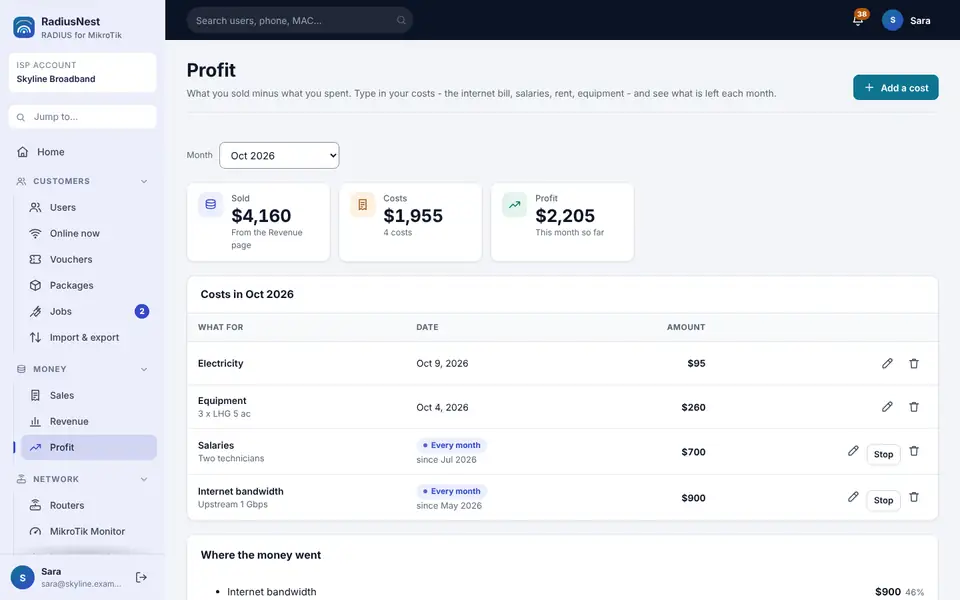
What you sold minus bandwidth, salaries and rent, month by month. Receipts and invoices carry your tax number and your own note. How it works.
Simple USD plans for your RadiusNest subscription. Pay by card or crypto and your plan starts by itself as soon as the payment is confirmed.
Every customer with an unpaid renewal and the total owed. WhatsApp reminders, printable statements, and mark many paid at once.
Connect a router with one paste, then watch and reach everything behind it.
Paste one script and the router is connected - RouterOS v6 or v7. Then RadiusNest finds its ports and internet connection and builds the hotspot and PPPoE server for you, even on the free trial. How it works.
WebFig in your browser or Winbox from your computer for any connected router, without a public IP or port forwarding on the router. How it works.
Who is online, on which router, with IP, MAC, uptime and data used. Login logs show every accept and reject with the reason.
See which apps your customers spend their data on - TikTok, YouTube, Facebook and WhatsApp, games, updates - on each router, for today, 7 days or 30 days - and put calls and games first when the line is full (beta). How it works · Free app address list generator.
Every tower, access point and customer radio - found by Discover with one Add button - is watched by its router: one alert on Telegram and email when one is down, and one click to open its web page or Winbox from anywhere. How it works.
Every MikroTik's settings saved each night and kept 30 days. Download one and put it on a new router when one dies. How it works.
See which apps and sites each customer uses - TikTok, YouTube, games, every site. Sell packages with app data: YouTube 15 GB, TikTok 10 GB. How it works
A daily data budget that comes down a little each day - for example 2% less than yesterday, down to a floor you choose. When a day's budget is used, the line is held at a slowest speed you choose until midnight. Nothing is pasted on the router. How it works
Resellers, staff and technicians each get exactly the login they need.
A reseller login sells its own packages to its own customers and never sees anyone else's. You see everything, and manage any reseller's work from your Team page - so your own lists stay yours.
Your team manages users, vouchers and sessions - without Winbox and without ever seeing your router secrets.
Customers report problems from their account page or Telegram, new ones ask for a connection with their location, and your technicians work through one list. How it works.
Reply to a customer's report from the job. They read it on their account page and your Telegram bot, and can answer back.
Each router keeps its own encrypted link to RadiusNest. Logins are checked there, limits are enforced on the router, and your customers reach their own account from anywhere.
"How much data do I have left?" "I forgot my password." "Is my package finished?" Your customers can answer all of it themselves - on their own page, or in your own Telegram bot, in their own language.
One short link of your own. A customer signs in with the same internet username and password they already have - nothing new to remember.
A reseller's customer sees the reseller's phone number. Your customers see yours.
Under your own name. Make the bot in Telegram, paste the token once, and hand the link to your customers. Your token is kept encrypted and is never shown again.
English, اردو, پښتو, فارسی / دری and العربية. Each customer picks their own the first time and can change it whenever they like; you choose the one new customers are greeted in.
A customer writes to the bot and it arrives in your own Telegram. Reply to it there and your answer appears in their chat, under your name.
A password typed into a chat is removed from it straight away. The bot never says whether a username exists, and too many wrong tries makes that chat wait.
A phone handed to a child. A voucher bought for one job. A shop till that should not be streaming. Your customers can narrow their own line to WhatsApp and nothing else - and open it up again whenever they like.
Available once your routers have the latest setup script - one paste, as always.
Two buttons on the customer's own page, with the one they are on ticked - and one line underneath promising that their days, their data and their speed do not change.
Most ISPs piece these together from separate software, scripts and spreadsheets. RadiusNest does all of it, and they share the same customers and routers - so nothing is typed twice.
Every plan includes every feature - self-service page, your own customer bot, resellers, currencies and all. Pay for 1, 3, 6 or 12 months. Renewing early never loses days.
Loading current prices…
Full pricing, what is included and how billing works → · 14-day refund policy
Users over their days, data or time are refused with a clear reason and disconnected while online - no notebook, no Winbox.
Every voucher and renewal is counted the day it is sold, in your currency, split by who sold it. Your own plan starts the moment your payment is confirmed.
All routers, all users, all logs, all resellers - in a dashboard your staff can use without ever seeing a router password.
"How much is left?" and "I forgot my password" answer themselves on the customer's own page or in your bot, at midnight too.
Your RadiusNest subscription is priced in US dollars and paid by card or crypto. What you charge your own customers is in whichever currency you choose.
Credit or debit card, or any of the coins shown.
Credit or debit card, or stablecoins on the networks shown - see the payment page for details.
Paying from an exchange? Exchanges take a withdrawal fee. Make sure the amount that arrives is exactly the amount shown, and use the network shown.
MikBot is our separate, simpler service: it connects one router to your own Telegram bot so you and your staff can run it. RadiusNest's bot is the other way round - it is for your customers.
Add Hotspot and PPPoE users, change passwords, limits, profiles, MAC and IP, kick or delete - with buttons in your own bot.
Make up to 100 vouchers at once as a printable PDF, or a QR code that logs a customer in by scanning.
Create profiles like 3h, 1d or 30days. The expiry is stamped at first login and expired users are cleaned up.
Router health, live traffic, active sessions, top users, MAC bypass and a one-tap backup sent to your chat.
Loading MikBot prices…
No. RadiusNest runs everything for you in the cloud - the authentication, the billing and the dashboard. You only need a MikroTik router with internet.
Yes. Every connected router has a Remote management tile: Open WebFig opens the router's web interface in your browser, Open Winbox gives you an address for Winbox on your computer. It works without a public IP or port forwarding, because it uses the router's existing encrypted link to RadiusNest. Only the ISP owner can use it, sessions are short-lived and logged. Read the guide.
Yes. Add M-Pesa (Kenya, to your own Paybill or Till) or pawaPay (mobile money in 21 African countries, including MTN, Airtel, Orange, Wave and M-Pesa) to your shop. The customer types their number, enters their PIN on the payment request that pops up on the phone, and the login is made or renewed by itself. The money goes straight to your own account, and a payment only counts once the provider confirms it. Read the guide.
Yes. Add Stripe (cards, Apple Pay, Google Pay), PayPal, Flutterwave (cards and mobile money in Africa), Xendit (South-East Asia), Razorpay (India, UPI) or Mercado Pago (Latin America, Pix) to your shop. The customer taps Pay, pays on the provider's own secure page, and the login is made or renewed by itself. The money goes straight to your own account, and a payment only counts once the provider confirms it. Read the guide.
Yes. Paste one script to connect the router, then open Automatic setup: RadiusNest reads the router, finds its ports and where the internet comes in, and proposes which ports to bridge and free address ranges. Press Set up the router and it builds the bridge, the hotspot, the PPPoE server and internet sharing for you. It saves a backup on the router first, never touches the internet connection, puts everything back by itself if the router stops answering, and can be undone any time. It is included in the free trial. Read the guide.
Yes. Open Most used on a router: RadiusNest counts the data per app - YouTube, TikTok, Netflix, Facebook, Instagram and WhatsApp, Telegram, Zoom and Meet calls, mobile games like PUBG and Free Fire, Steam, Windows Update and the app stores - with download and upload, for today, 7 days or 30 days. It only counts: nothing is blocked or slowed. The same address lists are free for any MikroTik in our address list generator.
Yes. Data budget is switched on per router. You tick the internet port, then set how many percent less each day should use than the day before (for example 2%), the lowest the budget may fall to (for example 50% of the first day) and the slowest speed (for example 10 Mbps). RadiusNest reads the router's port counters and, only when a day's budget is used, holds the line at the slowest speed until midnight, then lifts it by itself. It works with any internet source, Starlink included, because it manages bandwidth on your own MikroTik. It is in beta, nothing is pasted on the router, and you can turn it off at any time. Read the guide.
Yes. Add your towers, access points and customer radios on the Network devices page. The MikroTik that can reach each one pings it every 30 seconds, and you get one alert on Telegram and by email when a device is down for 2 minutes, and one when it is back.
Yes. Press Open next to any device: its web page opens in a new tab, or you get a Winbox address for a MikroTik - through the router it sits behind, with no public IP needed. You log in with the device's own password.
Yes. Customers report a problem from their account page or your Telegram bot, and new customers fill in a Get connected form with their location. Everything lands in one Jobs list you can give to your technicians.
Yes. Every router's settings are saved every night and kept 30 days. Download any copy and follow the steps to replace a dead router; passwords never leave the router.
Yes. Add your costs - bandwidth, salaries, rent, equipment - once or every month, and the Profit page shows what you sold minus what you spent for each month. Receipts and invoices can carry your tax number.
Yes. A customer can type a question in their own words - "why is my internet slow?", "when does my package end?" - and the bot answers from that customer's own account, in their language, with the button that fixes it (Renew, Change password). Anything it cannot settle is passed to you with one tap, and you answer by replying. You can switch it off and set a daily limit.
No. Each package says how many devices may use one login at the same time. A device over the limit is refused with "This login is already in use on another device", and an extra device that got on anyway is disconnected within about a minute, while the first devices keep their place.
RouterOS v7 and RouterOS v6 both work. The dashboard makes the right setup script for the router you are adding.
Yes. Every ISP gets its own self-service page and can run its own Telegram bot. A customer signs in with the same internet username and password, sees how much data and how many days are left, changes their password and logs themselves off - without calling you.
Your Telegram bot speaks English, Urdu, Pashto, Dari or Persian and Arabic. Each customer picks their own the first time and can change it whenever they like.
Yes, if you offer it. A customer narrows their own connection to WhatsApp and nothing else - useful for a phone given to a child, or to make a bundle last - and opens it up again whenever they like. What they bought does not change: the days, the data and the speed stay exactly as sold.
Yes. You choose the currency your own customers pay in, and your package prices, voucher cards and takings are all shown in it. Money you have already taken keeps the currency it was taken in, so changing this never rewrites your past figures.
Yes. A reseller login runs its own small shop: its own packages and its own customers, and it never sees anyone else's. You see everything, and can manage any reseller's customers and packages from your Team page.
Yes. Each ISP only sees its own routers, users and logs. Two ISPs can even use the same username.
Your users keep working for a few grace days while you renew; adding new users is paused. You get reminder emails before and after the end date.
Yes. An upgrade starts at once. A cheaper plan starts when the current one ends, so you never lose paid days.
RadiusNest is a full authentication and billing system in the cloud for ISPs with many users and routers, and it includes a customer-facing bot your own customers talk to. MikBot is a separate, simpler Telegram bot that lets you and your staff manage users on one MikroTik router without Winbox.
RadiusNest plans can be paid by credit or debit card: the payment is taken on a secure checkout page by our payment partner, and your plan starts by itself within seconds. You can also pay with crypto (USDT, USDC and other major coins), activated automatically. MikBot can be paid by card, USDT or USDC.
Yes. RadiusNest and MikBot run in the cloud and work with MikroTik routers anywhere in the world. Our plans are priced in US dollars; what you charge your own customers is in whichever currency you choose.
Yes, both services have a free trial. No payment is needed to start.
Yes. Add app limits to a package - for example YouTube 15 GB and TikTok 10 GB - as extra data or as part of the main data. When one is used up, only that app stops until the customer renews. RadiusNest also shows which apps and sites each customer uses.
Yes. Put customers in areas and give them a location, and see every customer, tower and open job on one map. There is also a Who owes list with WhatsApp reminders and printable statements.
Short answers here; the binding wording is in our Terms, Refund policy and Privacy pages.
No. RadiusNest is software only. Your customers pay you directly, by whatever means you arrange, and that money never passes through us. A voucher is simply a printed login code for your own Wi-Fi hotspot, which you print and sell yourself; a reseller is a login you give to someone who sells your packages for you. The only thing we sell is the RadiusNest subscription itself.
Yes. If you are not happy with a plan you paid for, write to support@radiusnest.net within 14 days of that payment and we refund it in full - whichever way you paid. You do not have to give a reason. A card payment goes back to the same card, and a crypto payment to the wallet it came from, in the same coin. Every plan also has a free trial, so you can try the whole service before paying anything. The full wording is on our Refund policy page.
No. There is no recurring charge and nothing renews by itself. You pay once for the months you choose, and when a plan nears its end we email you a reminder - renewing is always something you do, not something that happens to you. We never see or store card numbers.
Yes. Pay by card and tick "Renew automatically": your card is charged the same plan every 1, 3, 6 or 12 months and the plan extends by itself, so your users are never cut off because a renewal was forgotten. Turn it off any time on the Plan & billing page. Paying with crypto? Pay several months ahead - the time adds up. Either way we email you 7 days, 3 days and 1 day before your plan ends.
Stop renewing. There is no contract, no notice period and nothing to cancel: the plan simply runs to the end of the months you paid for. If you turned on automatic renewal, press "Turn off auto-renew" on the Plan & billing page first. Your users keep working for a few grace days after that while you decide.
You do. Your customer names, packages, payments and logs are yours. We hold them only to run the service for you, we do not sell them and we do not use them to market anything to your customers. Each ISP is kept separate: no other ISP on RadiusNest can see your data.
Your account and its data stay available while your plan is running and through the grace days, so nothing disappears while you are deciding. We do not delete an account on our own: if you want your data exported or deleted, write to support@radiusnest.net and we do it within 30 days; the last backup copies are gone within 60 days after that. The details are on our Privacy page.
No. We see what is needed to authenticate a login and to count usage - the username, the router, the address given out, session times and how many bytes were carried. We do not see, log or inspect the contents of anyone's traffic, and we do not keep a record of the sites your customers visit.
No. It works by where the traffic is going, not by what is in it - your router simply turns away anything not headed for WhatsApp. Nothing is opened, read or logged, and the customer turns it on and off themselves.
That depends entirely on your country, and it is your responsibility, not ours. Many places require an operator licence, customer records, or the ability to answer lawful requests from authorities. RadiusNest is a tool you run your business with - please check what your own regulator requires before you start selling.
Your own customers and your own network: that you have the right to sell the service, that your customers agree to your own terms, and that the service is not used for anything unlawful. We may suspend an account being used to break the law or to attack others - the full list is on our Terms page.
No. We are an independent service. MikroTik and RouterOS are trademarks of MikroTik SIA, and we are not affiliated with, endorsed by or sponsored by them.
Start the free trial, or talk to us first. We answer on WhatsApp, Telegram and email.